Exampad
Exampad
Exampad
Designing a learning ecosystem that brings preparation, practice, and performance insights into one place.
Designing a learning ecosystem that brings preparation, practice, and performance insights into one place.
Designing a learning ecosystem that brings preparation, practice, and performance insights into one place.
Role
Role
UI/UX Designer
UI/UX Designer
Duration
Duration
March 2025 – May 2025
March 2025 – May 2025
Team
Team
Me + Founder
Me + Founder
Contribution
Contribution
Research, Wireframes, UI Design, Prototyping
Research, Wireframes,
UI Design, Prototyping
Research, Wireframes, UI Design, Prototyping
exampad/ dashboard
exampad/ dashboard

Personalized Courses
Personalized Courses
Personalized Courses
Quizzes
Quizzes
Quizzes
Evaluation of Answer with AI
Evaluation of Answer with AI
Evaluation of Answer with AI
PYQ Analytics
PYQ Analytics
PYQ Analytics
Overview
Preparing for UPSC is more than watching lectures and attempting tests.
Preparing for UPSC is more than watching lectures and attempting tests.
Preparing for UPSC is more than watching lectures and attempting tests.
Preparing for UPSC isn't just about watching lectures or attempting mock tests. Aspirants constantly switch between multiple tools for learning, answer writing, previous year questions, performance tracking, and doubt solving.
Exampad was built to unify this fragmented experience into a single platform that supports every stage of preparation—from learning concepts to evaluating handwritten answers with AI.
Preparing for UPSC isn't just about watching lectures or attempting mock tests. Aspirants constantly switch between multiple tools for learning, answer writing, previous year questions, performance tracking, and doubt solving.
Exampad was built to unify this fragmented experience into a single platform that supports every stage of preparation from learning concepts to evaluating handwritten answers with AI
My Contribution
I worked across flows, wireframes, high-fidelity design, and prototypes.
I worked across flows, wireframes, high-fidelity design, and prototypes
I worked across flows, wireframes, high-fidelity design, and prototypes.
During my time on Exampad, I had the opportunity to contribute across several key parts of the platform while working closely with the founder. The project exposed me to the challenges of designing for a complex domain, where learning, assessments, analytics, and student engagement all needed to work together seamlessly.
My contribution extended beyond individual screens to designing workflows that connected different parts of the learning journey. From course experiences and assessments to AI-powered evaluation and performance analytics, I helped translate product requirements into experiences that supported students throughout their preparation process.
During my time on Exampad, I had the opportunity to contribute across several key parts of the platform while working closely with the founder. The project exposed me to the challenges of designing for a complex domain, where learning, assessments, analytics, and student engagement all needed to work together seamlessly.
My contribution extended beyond individual screens to designing workflows that connected different parts of the learning journey. From course experiences and assessments to AI-powered evaluation and performance analytics, I helped translate product requirements into experiences that supported students throughout their preparation process.
0+
0+
0+
0+
Days of Contribution
Days of Contribution
0+
0+
0+
0+
User Flows Designed
User Flows Designed
0+
0+
0+
0+
Screens Designed
Screens Designed
0%
0%
0%
0%
Project Coverage
Project Coverage
Design Approch
Understanding the problem before crafting the solution.
Understanding the problem before crafting the solution.
Every feature in Exampad started with understanding the problem rather than designing the interface. Since this was my first product in the EdTech space, I spent time learning how UPSC aspirants prepare, what challenges they face, and how existing platforms approached similar experiences..
Instead of jumping directly into high-fidelity designs, I worked closely with the founder to break down each requirement, explore different approaches, and validate ideas through quick sketches and user flows. This iterative process helped transform complex product requirements into clear, intuitive experiences while ensuring every design decision aligned with the product's vision.
Every feature in Exampad started with understanding the problem rather than designing the interface. Since this was my first product in the EdTech space, I spent time learning how UPSC aspirants prepare, what challenges they face, and how existing platforms approached similar experiences..
Instead of jumping directly into high-fidelity designs, I worked closely with the founder to break down each requirement, explore different approaches, and validate ideas through quick sketches and user flows. This iterative process helped transform complex product requirements into clear, intuitive experiences while ensuring every design decision aligned with the product's vision.

Beyond following a process, I relied on a few design principles that influenced every decision—from simplifying complex workflows to helping learners stay focused throughout their preparation journey.
Beyond following a process, I relied on a few design principles that influenced every decision—from simplifying complex workflows to helping learners stay focused throughout their preparation journey.
Simplify Complexity
Simplify Complexity
Break complex workflows into clear,
intuitive experiences that are easy
to understand and navigate.
Break complex workflows in clear,
intuitive experiences that are easy
to understand.
Guide Progress
Guide Progress
Design every step to help learners
understand where they are and
what comes next.
Design every step to help learners
understand where they are and
what comes next.
Design With Purpose
Design With Purpose
Every interaction should contribute
to meaningful learning, not just
complete a task.
Every interaction should contribute
to meaningful learning, not just
complete a task.

Platform Ecosystem
A complete preparation journey, connected through one platform.
A complete preparation journey, connected through one platform.
Rather than solving a single problem, Exampad was designed as an ecosystem where every feature supports a different stage of a student's preparation. From learning concepts to evaluating answers and tracking progress, each experience works together to create a continuous learning journey.
Rather than solving a single problem, Exampad was designed as an ecosystem where every feature supports a different stage of a student's preparation. From learning concepts to evaluating answers and tracking progress, each experience works together to create a continuous learning journey.
Learning Experience
Learning Experience
Structured content built for exam readiness
Structured content built for exam readiness
AI Answer Evaluation
AI Answer Evaluation
Instant feedback powered by adaptive intelligence
Instant feedback powered by adaptive intelligence
PYQ Practice
PYQ Practice
Previous year questions with guided solutions
Previous year questions with guided solutions
Assessments
Assessments
Timed mock tests mirroring real exam conditions
Timed mock tests mirroring real exam conditions
Performance Analytics
Performance Analytics
Visual insights into your progress over time
Visual insights into your progress over time
Community
Community
Learn alongside peers, mentors, and toppers
Learn alongside peers, mentors, and toppers
Exampad
Exampad
Feature Breakdown
Every feature started with a problem to solve.
Every feature started with a problem to solve.
Every feature in Exampad was designed to solve a specific challenge in the UPSC preparation journey. Rather than focusing only on interface design, I approached each experience by understanding the user's problem, exploring possible solutions, and making decisions that balanced usability, learning outcomes, and product goals. Below are the key experiences I contributed to and the thinking behind each of them.
Every feature in Exampad was designed to solve a specific challenge in the UPSC preparation journey. Rather than focusing only on interface design, I approached each experience by understanding the user's problem, exploring possible solutions, and making decisions that balanced usability, learning outcomes, and product goals. Below are the key experiences I contributed to and the thinking behind each of them.
01
01
AI Answer Evaluation
AI Answer Evaluation
The goal was to create an evaluation experience that felt less like receiving a score and more like getting feedback from an experienced mentor. Every interaction needed to encourage improvement rather than simply measure performance.
The goal was to create an evaluation experience that felt less like receiving a score and more like getting feedback from an experienced mentor. Every interaction needed to encourage improvement rather than simply measure performance.
Problem
Problem
In the UPSC Mains examination, candidates answer descriptive questions within a fixed word limit, where marks are awarded not only for subject knowledge but also for answer structure, clarity and relevance, . Regular answer writing is essential, and meaningful improvement depends on receiving detailed feedback after every attempt.
However, aspirants often lack a dedicated platform to evaluate their answers. They rely manual reviews by mentors or coaching institutes, making consistent practice and timely improvement difficult. This created an opportunity to provide structured, AI-powered evaluation that closely follows the actual UPSC answer assessment methodology.
In the UPSC Mains examination, candidates answer descriptive questions within a fixed word limit, where marks are awarded not only for subject knowledge but also for answer structure, clarity and relevance, . Regular answer writing is essential, and meaningful improvement depends on receiving detailed feedback after every attempt.
However, aspirants often lack a dedicated platform to evaluate their answers. They rely manual reviews by mentors or coaching institutes, making consistent practice and timely improvement difficult. This created an opportunity to provide structured, AI-powered evaluation that closely follows the actual UPSC answer assessment methodology.
TRADITIONAL
Student Writes Answer
Student Writes Answer
↓
Wait Days
Wait Days
↓
Receive Marks
Receive Marks
↓
Unsure How To Improve
Unsure How To Improve
EXAMPAD AI
Upload Answer
Upload Answer
↓
AI Evaluation
AI Evaluation
↓
Detailed Feedback
Detailed Feedback
↓
Improve Next Attempt
Improve Next Attempt
Goal
Goal
The objective was to create an evaluation experience that feels like receiving guidance from an experienced UPSC mentor rather than simply viewing a score. The solution needed to deliver meaningful feedback quickly, reduce the dependency on manual reviews, and help students continuously improve with every answer they submit.
The objective was to create an evaluation experience that feels like receiving guidance from an experienced UPSC mentor rather than simply viewing a score. The solution needed to deliver meaningful feedback quickly, reduce the dependency on manual reviews, and help students continuously improve with every answer they submit.
01
Faster Feedback
Faster Feedback
Receive meaningful feedback within minutes instead of relying on manual evaluations.
Receive meaningful feedback within minutes instead of relying on manual evaluations.
02
Structured Analysis
Structured Analysis
Mirror the actual UPSC evaluation methodology to make feedback familiar and trustworthy.
Mirror the actual UPSC evaluation methodology to make feedback familiar and trustworthy.
03
Continuous Improvement
Continuous Improvement
Help students understand what to improve after every answer they submit.
Help students understand what to improve after every answer they submit.
Design Decisions
Design Decisions
Every design decision was guided by a single question: how can this help students improve? Instead of creating a workflow that ends with a score, I focused on building an experience that delivers meaningful feedback, encourages reflection, and supports continuous learning with every answer submitted.
Every design decision was guided by a single question: how can this help students improve? Instead of creating a workflow that ends with a score, I focused on building an experience that delivers meaningful feedback, encourages reflection, and supports continuous learning with every answer submitted.
Flexible Answer Submission
Flexible Answer Submission
Supports both handwritten and digital answers — so no student has to change how they practice.
Supports both handwritten and digital answers — so no student has to change how they practice.
Supports both handwritten and digital answers — so no student has to change how they practice.
Students have different ways of practicing—some write answers digitally while others prefer handwriting on paper. To support both habits, I designed the experience to accept typed responses as well as scanned PDF or image uploads without changing the evaluation workflow.
Students have different ways of practicing—some write answers digitally while others prefer handwriting on paper. To support both habits, I designed the experience to accept typed responses as well as scanned PDF or image uploads without changing the evaluation workflow.
Students have different ways of practicing—some write answers digitally while others prefer handwriting on paper. To support both habits, I designed the experience to accept typed responses as well as scanned PDF or image uploads without changing the evaluation workflow.
PDF / IMAGE
HANDWRITTEN
TYPED
ONE EVALUATION FLOW
ONE EVALUATION
FLOW
Format independent
Transparent AI Processing
Transparent AI Processing
Makes every stage of processing visible — students always know what is happening with their submission.
Makes every stage of processing visible — students always know what is happening with their submission.
Makes every stage of processing visible — students always know what is happening with their submission.
Since AI evaluation takes time, I introduced a progress state that clearly communicates each stage of processing—from uploading and analyzing to generating the final report. This reassures users that their submission is progressing instead of leaving them waiting on a blank screen.
Since AI evaluation takes time, I introduced a progress state that clearly communicates each stage of processing—from uploading and analyzing to generating the final report. This reassures users that their submission is progressing instead of leaving them waiting on a blank screen.
Since AI evaluation takes time, I introduced a progress state that clearly communicates each stage of processing—from uploading and analyzing to generating the final report. This reassures users that their submission is progressing instead of leaving them waiting on a blank screen.
UPLOAD
ANALYZE
EVALUATE
REPORT
Actionable Feedback Over Scores
Actionable Feedback Over Scores
Replaces a raw score with strengths, gaps, and next steps a student can immediately act on.
Replaces a raw score with strengths, gaps, and next steps a student can immediately act on.
Replaces a raw score with strengths, gaps, and next steps a student can immediately act on.
Instead of presenting only a final score, I prioritized structured feedback that explains strengths, weaknesses, section-wise analysis, and improvement suggestions. This shifts the experience from assessment to continuous learning.
Instead of presenting only a final score, I prioritized structured feedback that explains strengths, weaknesses, section-wise analysis, and improvement suggestions. This shifts the experience from assessment to continuous learning.
Instead of presenting only a final score, I prioritized structured feedback that explains strengths, weaknesses, section-wise analysis, and improvement suggestions. This shifts the experience from assessment to continuous learning.
RAW SCORE
62
62
ACTIONABLE DIRECTION
Strengths
Strengths
Gaps
Gaps
Next step
Next step
Side-by-Side Review
Side-by-Side Review
Keeps the original answer and AI evaluation side by side — no context-switching between screens.
Keeps the original answer and AI evaluation side by side no context-switching between screens.
Keeps the original answer and AI evaluation side by side — no context-switching between screens.
Students should never lose context while reviewing feedback. The final report keeps the written answer alongside the AI evaluation, making it easier to compare their writing with the generated insights and understand exactly where improves.
Students should never lose context while reviewing feedback. The final report keeps the written answer alongside the AI evaluation, making it easier to compare their writing with the generated insights and understand exactly where improves.
STUDENT ANSWER
AI EVALUATION
User Flow
User Flow
The evaluation flow was designed to keep the process simple, predictable, and distraction-free. Every step guides students naturally through answer submission, AI evaluation, and detailed feedback, allowing them to focus on learning rather than understanding the system.
The evaluation flow was designed to keep the process simple, predictable, and distraction-free. Every step guides students naturally through answer submission, AI evaluation, and detailed feedback, allowing them to focus on learning rather than understanding the system.
The evaluation flow was designed to keep the process simple, predictable, and distraction-free. Every step guides students naturally through answer submission, AI evaluation, and detailed feedback, allowing them to focus on learning rather than understanding the system.
Choose Subject
Choose Subject
→
→
Select Marks
Select Marks
→
→
Upload Question
Upload Question
→
→
Upload Answer
Upload Answer
→
→
Submit
Submit
→
→
AI Processing
AI Processing
→
→
Evaluation Report
Evaluation Report
01
01
Configure Evaluation
Configure Evaluation
Before starting the evaluation, students configure the exam type, total marks, and evaluation mode. These inputs provide the AI with the necessary context to assess answers using the appropriate criteria. Keeping this setup simple ensures students can begin practicing quickly without unnecessary complexity.
Before starting the evaluation, students configure the exam type, total marks, and evaluation mode. These inputs provide the AI with the necessary context to assess answers using the appropriate criteria. Keeping this setup simple ensures students can begin practicing quickly without unnecessary complexity.
Before starting the evaluation, students configure the exam type, total marks, and evaluation mode. These inputs provide the AI with the necessary context to assess answers using the appropriate criteria. Keeping this setup simple ensures students can begin practicing quickly without unnecessary complexity.
DESIGN INSIGHT
DESIGN INSIGHT
Minimal setup reduces friction and keeps the focus on answer writing rather than configuration.
Minimal setup reduces friction and keeps the focus on answer writing rather than configuration.
Exampad/ Exam Details
Exampad/ Exam Details
Exampad/ Question Details
02
02
Provide the Question
Provide the Question
Students can either type the question manually or upload it as an image if it's already available. Supporting both input methods accommodates different preparation habits while keeping the workflow consistent. This flexibility allows users to move directly into practice without changing how they normally study.
Students can either type the question manually or upload it as an image if it's already available. Supporting both input methods accommodates different preparation habits while keeping the workflow consistent. This flexibility allows users to move directly into practice without changing how they normally study.
Students can either type the question manually or upload it as an image if it's already available. Supporting both input methods accommodates different preparation habits while keeping the workflow consistent. This flexibility allows users to move directly into practice without changing how they normally study.
DESIGN INSIGHT
DESIGN INSIGHT
Flexible input methods adapt to the student's workflow instead of forcing a new one.
Flexible input methods adapt to the student's workflow instead of forcing a new one.
03
03
Upload Answer
Upload Answer
Students upload handwritten answers as PDFs or images for evaluation. Contextual guidance helps ensure files meet the required quality, reducing submission errors and improving the accuracy of AI analysis. The upload process was designed to feel familiar and straightforward.
Students upload handwritten answers as PDFs or images for evaluation. Contextual guidance helps ensure files meet the required quality, reducing submission errors and improving the accuracy of AI analysis. The upload process was designed to feel familiar and straightforward.
Students upload handwritten answers as PDFs or images for evaluation. Contextual guidance helps ensure files meet the required quality, reducing submission errors and improving the accuracy of AI analysis. The upload process was designed to feel familiar and straightforward.
DESIGN INSIGHT
DESIGN INSIGHT
Clear upload guidance reduces submission errors and improves the accuracy of AI-generated evaluations.
Clear upload guidance reduces submission errors and improves the accuracy of AI-generated evaluations.
Exampad/ Upload Answer
Exampad/ Processing
04
04
AI Processing
AI Processing
Instead of leaving students waiting without feedback, the interface communicates every stage of the evaluation process—from uploading and analyzing to generating the final report. Visible progress helps build trust and reassures users that the system is actively working.
Instead of leaving students waiting without feedback, the interface communicates every stage of the evaluation process—from uploading and analyzing to generating the final report. Visible progress helps build trust and reassures users that the system is actively working.
Instead of leaving students waiting without feedback, the interface communicates every stage of the evaluation process—from uploading and analyzing to generating the final report. Visible progress helps build trust and reassures users that the system is actively working.
DESIGN INSIGHT
DESIGN INSIGHT
Transparent system feedback increases confidence during longer processing times.
Transparent system feedback increases confidence during longer processing times.
05
05
Evaluation Report
Evaluation Report
The final report presents more than just a score. Students receive structured feedback, section-wise analysis, strengths, weaknesses, and actionable suggestions that mirror the UPSC evaluation process. This transforms evaluation into an opportunity for continuous learning.
The final report presents more than just a score. Students receive structured feedback, section-wise analysis, strengths, weaknesses, and actionable suggestions that mirror the UPSC evaluation process. This transforms evaluation into an opportunity for continuous learning.
The final report presents more than just a score. Students receive structured feedback, section-wise analysis, strengths, weaknesses, and actionable suggestions that mirror the UPSC evaluation process. This transforms evaluation into an opportunity for continuous learning.
DESIGN INSIGHT
DESIGN INSIGHT
Structured feedback helps students quickly identify mistakes and confidently improve their next attempt.
Structured feedback helps students quickly identify mistakes and confidently improve their next attempt.
Exampad/ Evaluation Report
Design Showcase
Design Showcase
The final experience transforms a traditionally manual and time-consuming process into a guided AI-powered workflow. Every screen was designed to reduce friction, build confidence, and help students focus on improving rather than simply receiving a score.
The final experience transforms a traditionally manual and time-consuming process into a guided AI-powered workflow. Every screen was designed to reduce friction, build confidence, and help students focus on improving rather than simply receiving a score.
Exampad/ Mitra AI
Exampad/ Mitra AI
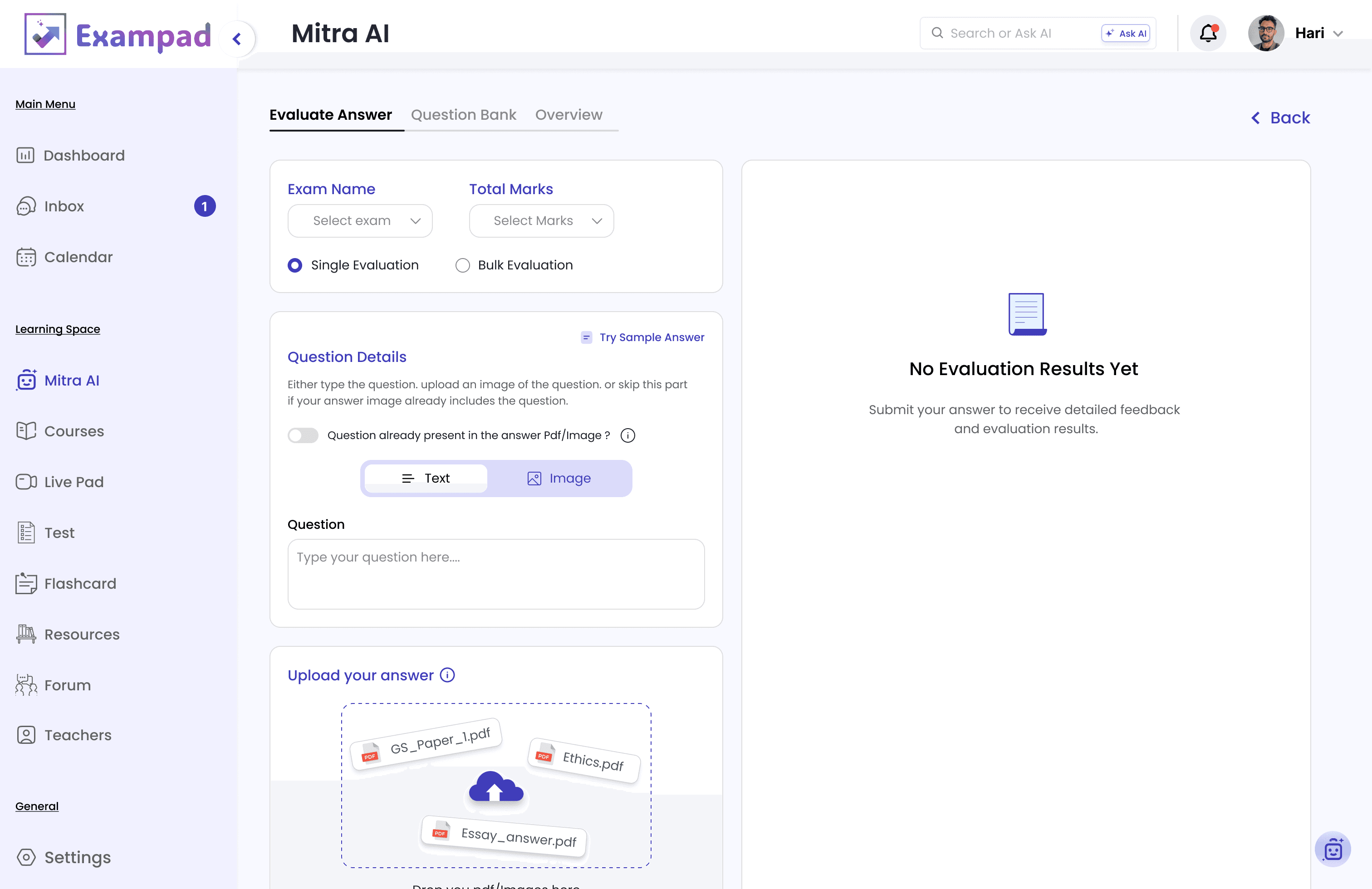
Exampad/ MItra AI / Exam Details Filled

Exampad/ Mitra AI / Uploaded

Exampad/ Mitra AI / Processing

Exampad/ MItra AI / Detailed Report

Exampad/ Mitra AI / Report Fullview

Exampad/ MItra AI / Download Report

02
02
PYQ Resources
PYQ Resources
Designed to make previous-year question practice more structured and insightful through smart filters, performance tracking, and trend analysis. Students can identify strengths, weak areas, recurring topics, and focus their preparation based on real exam patterns rather than guesswork.
Designed to make previous-year question practice more structured and insightful through smart filters, performance tracking, and trend analysis. Students can identify strengths, weak areas, recurring topics, and focus their preparation based on real exam patterns rather than guesswork.
Designed to make previous-year question practice more structured and insightful through smart filters, performance tracking, and trend analysis. Students can identify strengths, weak areas, recurring topics, and focus their preparation based on real exam patterns rather than guesswork.
01
01
Start Practice
Start Practice
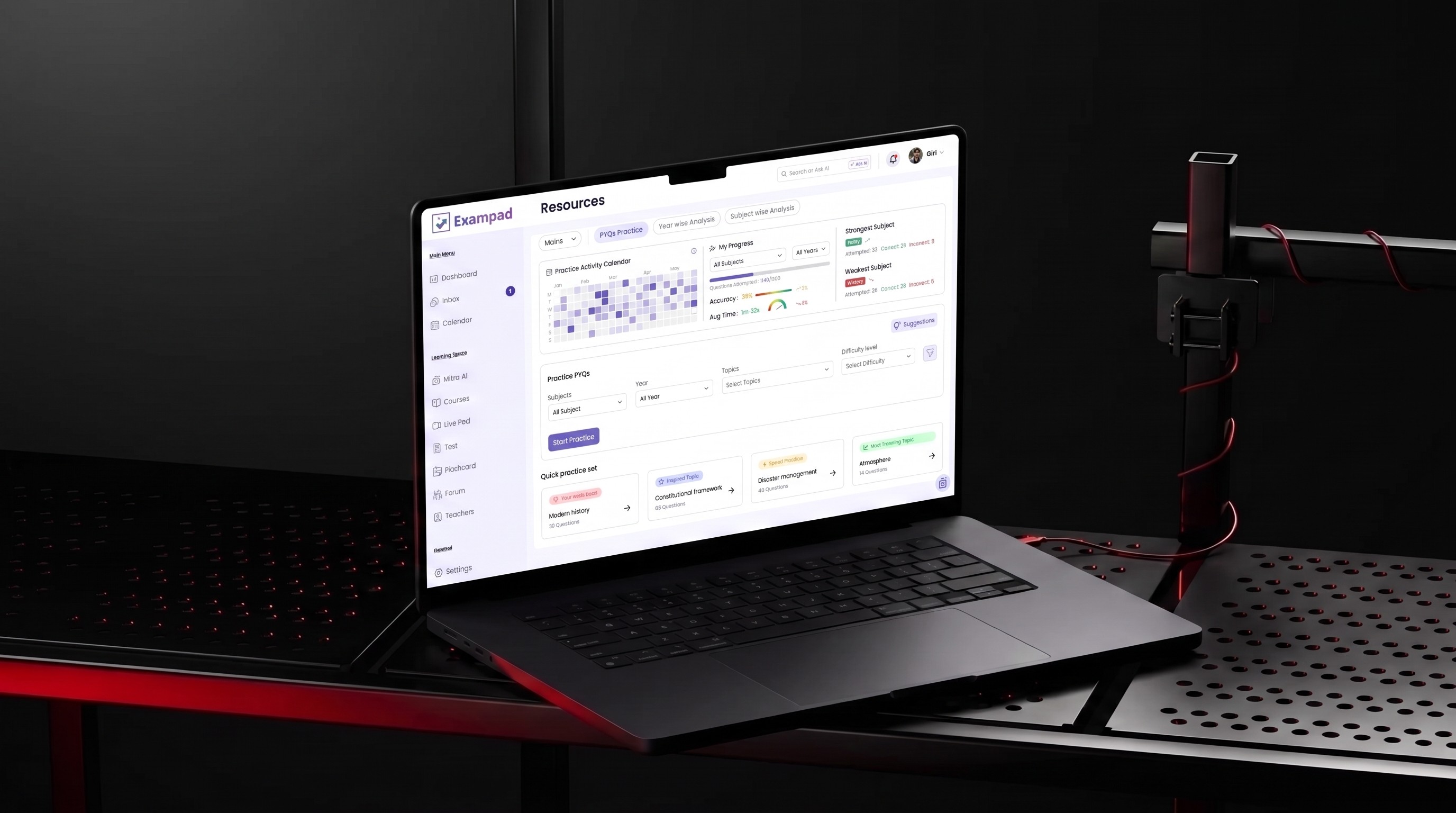
Students can build a PYQ practice set around what they want to improve, filtering questions by subject, year, topic, and difficulty. Their practice activity, accuracy, average time, and strongest and weakest subjects give them context before starting another session.
Students can build a PYQ practice set around what they want to improve, filtering questions by subject, year, topic, and difficulty. Their practice activity, accuracy, average time, and strongest and weakest subjects give them context before starting another session.
Students can build a PYQ practice set around what they want to improve, filtering questions by subject, year, topic, and difficulty. Their practice activity, accuracy, average time, and strongest and weakest subjects give them context before starting another session.
DESIGN INSIGHT
Keep performance and practice together, so students can decide what to work on without jumping between different parts of the platform.
Keep performance and practice together, so students can decide what to work on without jumping between different parts of the platform.

02
02
Understand Exam Trends
Understand Exam Trends
Year-wise analysis turns previous papers into a clearer view of how the exam has changed. Students can explore subject weightage, difficulty levels, and question types for a selected year, then compare years to see where patterns are shifting
Year-wise analysis turns previous papers into a clearer view of how the exam has changed. Students can explore subject weightage, difficulty levels, and question types for a selected year, then compare years to see where patterns are shifting
Year-wise analysis turns previous papers into a clearer view of how the exam has changed. Students can explore subject weightage, difficulty levels, and question types for a selected year, then compare years to see where patterns are shifting
DESIGN INSIGHT
Keep the same visual language across analysis and comparison, so attention stays on what changed rather than on learning a new interface.
Keep the same visual language across analysis and comparison, so attention stays on what changed rather than on learning a new interface.
03
03
Compare Exam Years
Compare Exam Years
Looking at one year gives students a snapshot; comparing years reveals how the exam is changing. Students can compare subject weightage, difficulty levels, and question types across two years to identify shifts in what the exam is emphasizing.
Looking at one year gives students a snapshot; comparing years reveals how the exam is changing. Students can compare subject weightage, difficulty levels, and question types across two years to identify shifts in what the exam is emphasizing.
Looking at one year gives students a snapshot; comparing years reveals how the exam is changing. Students can compare subject weightage, difficulty levels, and question types across two years to identify shifts in what the exam is emphasizing.
DESIGN INSIGHT
Make changes visible at a glance, helping students recognize patterns across exam cycles instead of interpreting each year separately.
Make changes visible at a glance, helping students recognize patterns across exam cycles instead of interpreting each year separately.


04
04
Explore a Subject Deeper
Explore a Subject Deeper
Subject-wise analysis narrows the broader exam trends into one subject, showing its weightage across years, recurring topics, difficulty, and question patterns. Smart Takeaways make the data easier to interpret, while the practice action connects those insights back to relevant PYQs
Subject-wise analysis narrows the broader exam trends into one subject, showing its weightage across years, recurring topics, difficulty, and question patterns. Smart Takeaways make the data easier to interpret, while the practice action connects those insights back to relevant PYQs
Subject-wise analysis narrows the broader exam trends into one subject, showing its weightage across years, recurring topics, difficulty, and question patterns. Smart Takeaways make the data easier to interpret, while the practice action connects those insights back to relevant PYQs
DESIGN INSIGHT
Move from broad patterns to focused insights, then give students a direct path back to practice.
Move from broad patterns to focused insights, then give students a direct path back to practice.
03
03
Study Planner
Study Planner
Created a centralized study planner that combines tasks, deadlines, subtasks, attachments, and calendar views into a single workspace. This helps students stay organized, prioritize their preparation, and build a consistent study routine throughout their exam journey.
Created a centralized study planner that combines tasks, deadlines, subtasks, attachments, and calendar views into a single workspace. This helps students stay organized, prioritize their preparation, and build a consistent study routine throughout their exam journey.
01
01
See What Needs Attention
See What Needs Attention
The planner starts with a clear view of the student’s workload - total, pending, completed, archived, and today’s tasks—followed by what needs attention now and what’s coming next. Weekly progress and the calendar add context without taking students away from their task list.
The planner starts with a clear view of the student’s workload - total, pending, completed, archived, and today’s tasks—followed by what needs attention now and what’s coming next. Weekly progress and the calendar add context without taking students away from their task list.
The planner starts with a clear view of the student’s workload - total, pending, completed, archived, and today’s tasks—followed by what needs attention now and what’s coming next. Weekly progress and the calendar add context without taking students away from their task list.
DESIGN INSIGHT
Prioritize immediate work while keeping overall progress visible, so students can quickly understand where they stand and what to focus on next.
Prioritize immediate work while keeping overall progress visible, so students can quickly understand where they stand and what to focus on next.


02
02
Manage Tasks in Detail
Manage Tasks in Detail
Selecting a task opens its details alongside the list, letting students manage deadlines, tags, attachments, subtasks, and comments without losing the context of their schedule. Larger study goals can be broken into smaller, manageable actions and tracked individually.
Selecting a task opens its details alongside the list, letting students manage deadlines, tags, attachments, subtasks, and comments without losing the context of their schedule. Larger study goals can be broken into smaller, manageable actions and tracked individually.
Selecting a task opens its details alongside the list, letting students manage deadlines, tags, attachments, subtasks, and comments without losing the context of their schedule. Larger study goals can be broken into smaller, manageable actions and tracked individually.
DESIGN INSIGHT
Keep task details within the same workspace, reducing unnecessary navigation while supporting more complex study plans.
Keep task details within the same workspace, reducing unnecessary navigation while supporting more complex study plans.
03
03
Plan Across the Schedule
Plan Across the Schedule
The calendar shifts the experience from daily task management to a broader view of the student’s schedule. Students can move between month, week, and day views to understand upcoming commitments and see when their study activities are planned.
The calendar shifts the experience from daily task management to a broader view of the student’s schedule. Students can move between month, week, and day views to understand upcoming commitments and see when their study activities are planned.
The calendar shifts the experience from daily task management to a broader view of the student’s schedule. Students can move between month, week, and day views to understand upcoming commitments and see when their study activities are planned.
DESIGN INSIGHT
Connect tasks with time, giving students both a focused view for getting things done and a broader view for planning ahead.
Connect tasks with time, giving students both a focused view for getting things done and a broader view for planning ahead.

04
04
Flashcards
Flashcards
Designed to make revision more structured through customizable flashcard sets, spaced practice, and progress tracking. Students can continue unfinished sessions, monitor learning status, and focus their revision on concepts that need more attention.
Designed to make revision more structured through customizable flashcard sets, spaced practice, and progress tracking. Students can continue unfinished sessions, monitor learning status, and focus their revision on concepts that need more attention.
Designed to make revision more structured through customizable flashcard sets, spaced practice, and progress tracking. Students can continue unfinished sessions, monitor learning status, and focus their revision on concepts that need more attention.
01
01
Flashcard Library
Flashcard Library
Students can choose flashcards based on how they want to revise—daily, subject-wise, year-wise, or from bookmarked cards. Ongoing sessions stay visible with attempted cards and scores, while students can also generate new flashcards from their own notes or uploaded material.
Students can choose flashcards based on how they want to revise—daily, subject-wise, year-wise, or from bookmarked cards. Ongoing sessions stay visible with attempted cards and scores, while students can also generate new flashcards from their own notes or uploaded material.
Students can choose flashcards based on how they want to revise—daily, subject-wise, year-wise, or from bookmarked cards. Ongoing sessions stay visible with attempted cards and scores, while students can also generate new flashcards from their own notes or uploaded material.
DESIGN INSIGHT
Bring ready-to-use, ongoing and self-created revision into one place, so students can start or resume without rebuilding their study.
Bring ready-to-use, ongoing and self-created revision into one place, so students can start or resume without rebuilding their study.


02
02
Practice Flashcards
Practice Flashcards
During practice, students focus on one question at a time, flip the card to reveal the answer, or use a hint when they need support. Instead of only marking a card complete, they can classify it as Known, Still Learning, or Not Covered, with progress updating throughout the session.
During practice, students focus on one question at a time, flip the card to reveal the answer, or use a hint when they need support. Instead of only marking a card complete, they can classify it as Known, Still Learning, or Not Covered, with progress updating throughout the session.
During practice, students focus on one question at a time, flip the card to reveal the answer, or use a hint when they need support. Instead of only marking a card complete, they can classify it as Known, Still Learning, or Not Covered, with progress updating throughout the session.
DESIGN INSIGHT
Make progress visible, not remembered, Live status tracking helps students quickly see what they know and what still needs revision.
Make progress visible, not remembered, Live status tracking helps students quickly see what they know and what still needs revision.
05
05
Forum
Forum
Built a community-driven discussion platform where students can ask doubts, explore related topics, and learn from shared experiences. Intelligent filtering and organized conversations help users quickly discover valuable insights without searching through lengthy threads.
Built a community-driven discussion platform where students can ask doubts, explore related topics, and learn from shared experiences. Intelligent filtering and organized conversations help users quickly discover valuable insights without searching through lengthy threads.
Built a community-driven discussion platform where students can ask doubts, explore related topics, and learn from shared experiences. Intelligent filtering and organized conversations help users quickly discover valuable insights without searching through lengthy threads.
01
01
Find Relevant Discussions
Find Relevant Discussions
Students can browse questions through search, tags, and filters such as newest, active, unanswered, or bountied. Voting, comments, saves, and trending discussions help useful conversations surface instead of turning the forum into an unstructured feed.
Students can browse questions through search, tags, and filters such as newest, active, unanswered, or bountied. Voting, comments, saves, and trending discussions help useful conversations surface instead of turning the forum into an unstructured feed.
Students can browse questions through search, tags, and filters such as newest, active, unanswered, or bountied. Voting, comments, saves, and trending discussions help useful conversations surface instead of turning the forum into an unstructured feed.
DESIGN INSIGHT
Clear discovery paths reduce the effort of finding relevant conversations in a growing community.
Clear discovery paths reduce the effort of finding relevant conversations in a growing community.


02
02
Discuss & Resolve
Discuss & Resolve
Opening a question shifts the experience from discovery to focused discussion. Students can post answers, vote on useful responses, comment, follow the conversation, and explore related questions without losing the context of the original problem.
Opening a question shifts the experience from discovery to focused discussion. Students can post answers, vote on useful responses, comment, follow the conversation, and explore related questions without losing the context of the original problem.
Opening a question shifts the experience from discovery to focused discussion. Students can post answers, vote on useful responses, comment, follow the conversation, and explore related questions without losing the context of the original problem.
DESIGN INSIGHT
Keeping the question and responses in one focused hierarchy makes useful answers easier to scan and evaluate.
Keeping the question and responses in one focused hierarchy makes useful answers easier to scan and evaluate.
Outcome
Complexity to a connected learning experience.
Complexity to a connected learning experience.
What started as a collection of learning requirements evolved into a connected product spanning 100+ screens, 8+ core flows, and both student and admin experiences.
My contribution went beyond delivering interfaces. I defined how courses, tests, AI evaluation, planning, PYQ practice, and Q&A should work together without making students navigate a collection of disconnected tools. On the admin side, I designed the supporting workflows required to manage those experiences at scale.
The result was a 0→1 product foundation with reusable patterns, predictable interactions, and enough flexibility for the platform to evolve as new learning workflows were introduced.
Because the product was still under development, I don't attach artificial engagement or conversion metrics to the work. The meaningful outcome at this stage was turning a broad product vision into a coherent experience that could move forward into development.
What started as a collection of learning requirements evolved into a connected product spanning 100+ screens, 8+ core flows, and both student and admin experiences.
My contribution went beyond delivering interfaces. I defined how courses, tests, AI evaluation, planning, PYQ practice, and Q&A should work together without making students navigate a collection of disconnected tools. On the admin side, I designed the supporting workflows required to manage those experiences at scale.
The result was a 0→1 product foundation with reusable patterns, predictable interactions, and enough flexibility for the platform to evolve as new learning workflows were introduced.
Because the product was still under development, I don't attach artificial engagement or conversion metrics to the work. The meaningful outcome at this stage was turning a broad product vision into a coherent experience that could move forward into development.
Reflaction
Designing the connections, not just the screens.
Designing the connections, not just the screens.
Exampad pushed me to think beyond individual screens and approach the product as an interconnected system. Designing across learning, testing, AI evaluation, planning, and admin workflows made me consider not only how each feature works, but how decisions in one part of the platform influence the rest of the experience.
The biggest learning was knowing where to create consistency and where a workflow needs its own behavior. With another iteration, I’d bring validation earlier into high-risk experiences like AI evaluation and test completion, define success signals upfront, and use real student behavior to challenge assumptions before expanding secondary features.
The project ultimately shifted my approach from designing feature by feature to designing around relationships, dependencies, and the complete product journey.
Exampad pushed me to think beyond individual screens and approach the product as an interconnected system. Designing across learning, testing, AI evaluation, planning, and admin workflows made me consider not only how each feature works, but how decisions in one part of the platform influence the rest of the experience.
The biggest learning was knowing where to create consistency and where a workflow needs its own behavior. With another iteration, I’d bring validation earlier into high-risk experiences like AI evaluation and test completion, define success signals upfront, and use real student behavior to challenge assumptions before expanding secondary features.
The project ultimately shifted my approach from designing feature by feature to designing around relationships, dependencies, and the complete product journey.
Contact
Contact
Whether it’s a new product, redesign, or fresh idea,
I’m always open to meaningful collaborations.
Whether it’s a new product, redesign,
or fresh idea,
I’m always open to meaningful collaborations.
Whether it’s a new product, redesign, or fresh idea,
I’m always open to meaningful collaborations.
Your Brand Deserves Better
Let’s Build It Together.
Your Brand Deserves Better
Let’s Build It Together.
Your Brand Deserves Better
Let’s Build It Together.
Are
Are
you
you
ready?
ready?
Are
Are
you
you
ready?
ready?
Are
Are
you
you
ready?
ready?